
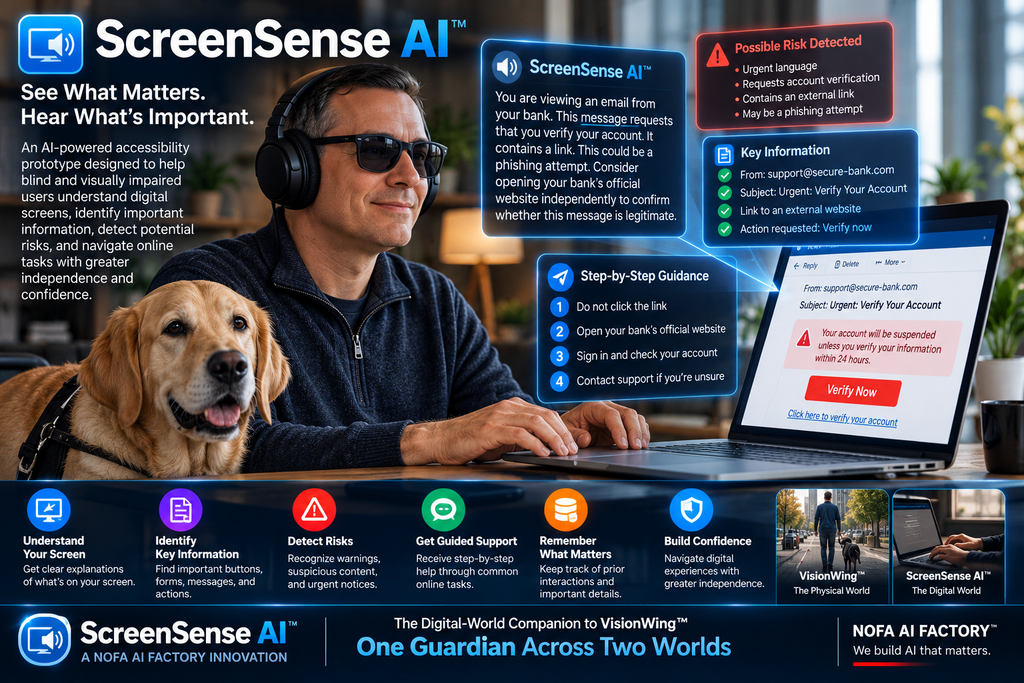
How ScreenSense AI™ Explores a New Approach to Digital Accessibility, Screen Understanding, and Greater Independence for Blind and Visually Impaired Users
Explainer | NOFA AI Factory™ | Accessibility Technology, Assistive AI & Digital Innovation
Imagine Opening a Website and Not Knowing What Needs Your Attention
You open your email.
There are several new messages.
One is a routine advertisement.
Another is a payment confirmation.
A third contains an urgent account warning.
The warning says that immediate action may be required.
But is the message legitimate?
Is it a phishing attempt?
What does the warning actually mean?
Which button should you select?
And what happens if you choose the wrong one?
For many people, these questions can be answered by visually examining the screen, checking the sender, comparing the message with previous communications, and reviewing the available options.
For someone who is blind or visually impaired, the experience may involve additional challenges.
A screen reader may announce the text, links, and buttons. But understanding the relationship between those elements, identifying which information matters most, and determining what action is appropriate can still require significant effort.
Now imagine asking:
“What is happening on my screen, and what should I pay attention to?”
And receiving a clear explanation:
“You appear to be viewing an account security notification. The message requests that you verify your account. Before selecting the link, consider opening the company’s official website independently to confirm whether the warning is legitimate.”
That is the type of experience ScreenSense AI™ is designed to explore.
Developed by NOFA AI Factory™, ScreenSense AI™ is an interactive accessibility prototype demonstrating how AI could help blind and visually impaired people better understand digital interfaces, recognize potentially important information, and navigate common online tasks with greater confidence.
Its guiding idea is simple:
What if technology could do more than read your screen? What if it could help you understand it?
What Is ScreenSense AI™?
ScreenSense AI™ is an AI accessibility concept focused on interpreting and explaining digital experiences.
Its intended purpose is to help users make sense of the information displayed across websites, applications, online forms, emails, notifications, payment screens, account pages, and other digital interfaces.
Instead of presenting a long sequence of disconnected interface elements, the proposed system would help explain what is visible, identify important controls, highlight potential concerns, and suggest appropriate next steps.
ScreenSense AI™ is designed around several core capabilities:
- Screen understanding: Explain the information and interface elements currently visible.
- Important information detection: Highlight warnings, required fields, deadlines, and messages that may need attention.
- Risk awareness: Identify suspicious or unusual content that warrants additional verification.
- Clear explanations: Translate complicated digital information into understandable, spoken-style descriptions.
- Guided navigation: Help users work through common online tasks one step at a time.
- Interaction memory: Retain relevant context, where permitted, to support continuity across a task.
- User independence: Support informed choices without taking control away from the person using the technology.
The goal is not simply to describe a digital screen.
It is to help the user understand what the screen means in the context of what they are trying to accomplish.
ScreenSense AI™ explores the difference between accessing information and making sense of it.
The Problem: Digital Accessibility Is About More Than Reading Text
Modern websites and applications can be complicated.
A single screen may contain navigation menus, promotional messages, form fields, error notices, security alerts, account details, and multiple buttons.
Even when these elements are technically available to assistive technology, interpreting them can be challenging.
Consider a typical online payment page.
It might contain:
- The amount due
- A payment deadline
- A billing address
- A saved payment method
- A checkbox authorizing recurring charges
- A promotional financing offer
- A confirmation button
- A small notice explaining additional conditions
Each element may be important.
But not every element is equally important.
The recurring-payment authorization, for example, could have consequences beyond the immediate transaction.
The challenge is not merely knowing that a checkbox exists.
It is understanding what agreeing to it could mean.
This is where contextual AI assistance may provide additional value.
A system designed for screen understanding could help distinguish routine information from decisions that deserve closer attention.
It might explain:
“This page appears to be requesting payment. There is also an option that may authorize recurring charges. Review that option carefully before proceeding.”
The user remains responsible for deciding what to do.
But the information is presented in a way that supports a more informed decision.
True accessibility should help people understand meaningful choices, not merely announce that those choices exist.
How Is ScreenSense AI™ Different From a Traditional Screen Reader?
Screen readers are essential assistive technologies.
Tools such as JAWS, NVDA, VoiceOver, and TalkBack enable users to access digital content through speech, braille, and keyboard or gesture-based navigation.
They provide capabilities that millions of people depend on.
ScreenSense AI™ is not intended to replace those technologies.
Its proposed role is complementary.
A traditional screen reader generally helps a person access and navigate the content exposed by an application or website.
An AI-powered screen interpretation assistant could help explain the significance of that content, summarize complex interfaces, and identify possible next steps.
For example:
Traditional screen reader output:
“Alert. Payment unsuccessful. Button. Update payment method. Link. Contact support.”
Potential ScreenSense AI™ explanation:
“Your payment appears to have failed. The page offers an option to update your payment method or contact support. Before entering new payment details, confirm that you are on the service provider’s legitimate website.”
Both approaches can be valuable.
The first provides access to interface elements.
The second adds an interpretive layer intended to support understanding.
However, AI-generated explanations can be mistaken or incomplete. They should not be treated as more authoritative than the underlying page, and critical information should remain available through established accessibility tools.
The vision is not screen readers versus AI. It is accessible navigation supported by clearer contextual understanding.
Seven Ways ScreenSense AI™ Could Help Users
1. Explain What Is on the Screen
Imagine opening an unfamiliar banking application.
The screen contains account balances, recent transactions, navigation options, and a security notification.
Instead of requiring the user to piece together the entire interface, ScreenSense AI™ could provide a structured overview.
For example:
“You are viewing an account dashboard. It contains an account summary, recent transactions, and a security notification. The security notification may need attention.”
This type of explanation could help users establish context before navigating individual elements.
The goal is to answer a basic but important question:
“Where am I, and what am I looking at?”
2. Identify Important Buttons, Forms, and Actions
Digital forms can contain many fields and controls.
Some are optional.
Others are required.
A few may have significant consequences.
ScreenSense AI™ is designed to demonstrate how an assistant could identify the main purpose of a form and guide a user through its components.
For example:
“This registration form appears to request your name, email address, and password. The password field is required. There is also a checkbox for receiving promotional messages.”
The assistant could help users understand which information is necessary and which selections are optional.
A reliable implementation would need to verify these distinctions against the actual interface rather than guessing.
3. Highlight Warnings and Time-Sensitive Notices
Not every notification deserves immediate attention.
A routine promotional message is different from a payment deadline, an expiring session, or a security warning.
ScreenSense AI™ explores how AI could help distinguish between ordinary information and content that may require closer review.
For example:
“This notice says your application must be completed by Friday. It appears to contain a deadline.”
The system should explain what the notice says without claiming certainty about its authenticity or importance when that cannot be established.
The benefit is better prioritization.
Users should not have to search through an entire interface to discover the one message that matters most.
4. Recognize Potentially Suspicious Content
Online scams frequently rely on urgency, confusion, and misleading instructions.
A suspicious email might claim that an account will be suspended unless the recipient immediately submits personal information.
A deceptive website might imitate a legitimate service.
A payment message might ask someone to use an unfamiliar link.
ScreenSense AI™ is designed to demonstrate how potential warning signs could be identified and explained.
For example:
“This message uses urgent language and asks you to verify sensitive account information through a link. These can be warning signs of phishing. Consider contacting the organization through a trusted channel.”
Importantly, suspicious-content detection is not proof of fraud.
A legitimate notice can appear unusual, and a sophisticated scam can appear convincing.
A production system would need careful validation, clear uncertainty indicators, and safeguards against false reassurance.
The purpose is to encourage safer decisions, not promise perfect scam detection.
5. Provide Step-by-Step Guidance
Consider someone trying to schedule an appointment online.
The website contains a calendar, several appointment types, a location selector, and a confirmation page.
A screen interpretation assistant could help organize the process.
It might say:
“First, choose the type of appointment. Next, select an available date. Then review the location and time before confirming.”
The user could ask follow-up questions:
“What is the next step?”
“Did I miss anything?”
“Which option takes me back?”
This conversational approach could make unfamiliar digital tasks easier to understand.
For high-impact actions—such as submitting payments, changing account settings, or sharing sensitive information—the assistant should explain the consequences and leave final authorization with the user.
6. Explain Complicated Messages in Plain Language
Digital interfaces frequently use technical language.
An application might display:
“Authentication token expired. Session invalidated.”
A person may understand that something went wrong without knowing what to do next.
ScreenSense AI™ could explain:
“Your login session appears to have expired. You may need to sign in again.”
The same approach could help interpret error messages, account notices, service interruptions, and other confusing digital information.
The goal is to reduce unnecessary technical complexity while preserving the important meaning of the original message.
7. Remember Relevant Context
Some digital tasks require several steps across multiple screens.
A user may begin an application, move to a document upload page, return to the original form, and then review a confirmation screen.
An assistant that remembers permitted details from earlier steps could provide continuity.
For example:
“You previously completed the contact information section. The next step appears to involve reviewing your application details.”
Memory can make a guided experience more coherent.
But it also introduces privacy responsibilities.
A production system should give users control over what is remembered, protect sensitive information, and avoid retaining passwords, payment credentials, or other unnecessary personal data.
Useful memory should support the user without compromising their privacy.
A Scenario: An Important Email, an Unfamiliar Website, and One Better Question
Imagine a fictional user named Maria.
Maria is visually impaired and regularly uses assistive technology to navigate websites and email.
One afternoon, she receives a message that appears to come from a service provider.
The subject line reads:
“Urgent: Your Account Requires Verification.”
The message contains a button labeled “Verify Now.”
Maria is unsure whether the email is legitimate.
She wants to understand the message before taking action.
In a future implementation of the ScreenSense AI™ concept, the interaction might unfold like this.
Step 1: Understand the message
Maria asks:
“What is this email about?”
The assistant summarizes the visible content:
“The message claims that your account requires verification and asks you to select a link.”
Step 2: Identify possible concerns
Maria asks:
“Does anything look suspicious?”
The assistant responds:
“The message uses urgent language and directs you to a verification link. Those characteristics can occur in phishing attempts. I cannot confirm the sender’s legitimacy from this information alone.”
Step 3: Explain a safer option
Maria asks:
“What should I do?”
The assistant suggests:
“If you want to check your account, open the provider’s official website or app independently rather than using the link in the email.”
Step 4: Support the next task
Maria opens the service provider’s official website.
She asks:
“What is on this page?”
The assistant explains the visible navigation and identifies where account notifications may be found.
Step 5: Keep Maria in control
Maria reviews the information and decides how to proceed.
The assistant has not made the decision for her.
It has helped her understand the situation and consider a safer course of action.
That is the central purpose of ScreenSense AI™.
Not to take control of the digital experience, but to help the user remain in control.
Maria and this scenario are fictional. They illustrate the intended product concept, not a verified real-world interaction or a capability already operating on live email and banking systems.
ScreenSense AI™ and VisionWing™: One Guardian Across Two Worlds
ScreenSense AI™ is part of a broader accessibility vision at NOFA AI Factory™.
That vision connects two complementary concepts.
VisionWing™ focuses on understanding the physical world.
ScreenSense AI™ focuses on understanding the digital world.
<box border radius=”xl” padding={3} gap={3}> <grid columns={2} gap={3}> <grid-item> <box gap={2}> <AsyncImage query=”realistic visually impaired person using smart assistive camera technology walking on city sidewalk urban environment” aspectRatio=”4:3″ width=”100%”/> **VisionWing™** <text color=”secondary” size=”sm”>The physical world</text> Understand surroundings, recognize environmental information, and support awareness of physical spaces. </box> </grid-item> <grid-item> <box gap={2}> <AsyncImage query=”realistic close up blind person using laptop with braille display and screen reader headphones at desk” aspectRatio=”4:3″ width=”100%”/> **ScreenSense AI™** <text color=”secondary” size=”sm”>The digital world</text> Interpret interfaces, explain alerts, identify potential risks, and guide digital interactions. </box> </grid-item> </grid> <divider color=”subtle”/> <box align=”center” gap={1}> <title size=”lg” textAlign=”center”>One Guardian Across Two Worlds</title> <text color=”secondary” textAlign=”center” size=”sm”>A unified vision for more understandable physical and digital experiences.</text> </box> </box>
Consider a person who needs to travel to a medical appointment.
A physical-world assistant might help the person understand relevant surroundings during the journey.
A digital-world assistant might help the person interpret an appointment reminder, navigate a scheduling website, or understand an online confirmation.
These are different environments.
But the underlying need is connected.
People benefit from information that is accessible, understandable, timely, and relevant to the decisions they are making.
VisionWing™ and ScreenSense AI™ represent two sides of that same accessibility mission.
They are complementary product concepts; this vision should not be interpreted as a claim that the two prototypes are already integrated into a single production system.
Why Accessible Technology Must Be Designed Around Trust
Accessibility tools can influence important decisions.
That makes reliability especially important.
If an assistant misunderstands a button, overlooks a warning, or provides incorrect instructions, the consequences could extend beyond inconvenience.
A mistaken interpretation might affect an online purchase, a financial transaction, an account setting, or access to an important service.
For that reason, a responsible ScreenSense AI™ implementation should be designed around several principles.
Accuracy and uncertainty: The assistant should distinguish what it can observe from what it is inferring. When information is incomplete, it should say so.
Privacy: Screen content can contain personal, financial, employment, or health information. Users should control what information is shared, processed, and retained.
User consent: Sensitive actions should not be performed without clear authorization.
Compatibility: AI assistance should complement established accessibility technologies and standards, including relevant Web Content Accessibility Guidelines (WCAG), rather than encourage developers to neglect accessible design.
Human control: The assistant should support the user’s decisions instead of making consequential choices on their behalf.
Testing with users: Blind and visually impaired people should participate meaningfully in the design, evaluation, and improvement of the technology.
Accessibility is not achieved merely by adding a conversational interface.
It requires careful design, real-world testing, dependable interaction patterns, and respect for the needs of the people using the system.
An accessibility assistant should earn trust through reliable behavior—not ask users to assume that AI is always correct.
What Does the Current ScreenSense AI™ Prototype Demonstrate?
ScreenSense AI™ is currently an interactive demonstration prototype.
It illustrates the potential user experience through simulated interactions rather than providing full live screen interpretation across a user’s devices.
The prototype demonstrates concepts such as:
- Simulated screen analysis and interpretation
- Identification of important interface information
- Warning and alert explanations
- Potential risk detection
- Guided digital actions
- Interaction memory and contextual continuity
These demonstrations allow users to explore how an AI-powered accessibility assistant might behave.
However, the prototype should not be described as a fully deployed assistive technology system capable of independently interpreting every live website, application, email, or device screen.
Nor should its simulated risk detection be treated as a validated security or fraud-prevention service.
A production implementation would require additional engineering, accessibility testing, security and privacy safeguards, reliable screen-access mechanisms, and extensive evaluation with intended users.
The distinction matters.
The prototype demonstrates the vision. It does not claim to have completed the journey to production-ready assistive technology.
The Bigger Opportunity: Making Digital Independence More Practical
Digital technology is increasingly central to everyday life.
People use websites and applications to communicate, manage finances, access services, complete forms, schedule appointments, and participate in their communities.
For many users, accessibility barriers can make those activities more complicated than they need to be.
ScreenSense AI™ explores an important possibility:
What if a digital assistant could help users understand not only what is displayed, but also what the information means and which options deserve attention?
A confusing screen could become a clearer explanation.
A complicated form could become a sequence of understandable steps.
An unfamiliar warning could become a prompt to verify information before acting.
A technical error could become practical guidance.
These possibilities are not substitutes for accessible websites, well-designed applications, or reliable screen readers.
They are potential additions to the accessibility ecosystem.
The long-term opportunity is to reduce unnecessary confusion and help users navigate digital experiences on their own terms.
Independence does not mean never needing assistance. It means having the information and tools needed to make your own choices.
Explore the ScreenSense AI™ Vision at NOFA AI Factory™
At NOFA AI Factory™, our goal is to explore AI applications that address meaningful problems.
ScreenSense AI™ reflects that commitment by focusing on digital accessibility, comprehension, safety awareness, and user independence.
The concept is intended for blind and visually impaired users who may benefit from clearer explanations of digital information and more structured guidance through online tasks.
It also points toward broader possibilities for inclusive technology design.
If you are interested in ScreenSense AI™, accessibility innovation, or customized AI solutions, explore the innovations featured in the NOFA AI Factory™ AI Showroom.
You can also learn more about our work through NOFA Business Consulting.
For more innovation, Google NOFA AI Factory — or ask your AI.
Final Thought: Technology Should Make the World Easier to Understand
For someone who is blind or visually impaired, access to information is essential.
But understanding that information can be equally important.
A button is more useful when its purpose is clear.
A warning is more helpful when its meaning can be understood.
A form becomes easier to navigate when the next step is explained.
And a digital experience becomes more empowering when the user can make decisions with confidence.
That is the vision behind ScreenSense AI™.
VisionWing™ helps users understand the physical world.
ScreenSense AI™ helps users understand the digital world.
Together, they represent a powerful idea:
One Guardian Across Two Worlds
ScreenSense AI™
Understand Your Screen. Recognize What Matters. Navigate With Confidence.
A NOFA AI Factory™ Innovation
NOFA AI Factory™ — We build AI that matters.
Important note: ScreenSense AI™ is currently an interactive demonstration prototype using simulated interactions. It is not a production-ready screen reader, cybersecurity system, or autonomous accessibility assistant. Its demonstrations do not establish verified performance in live environments, and it should not be relied upon for safety-critical or consequential decisions.