
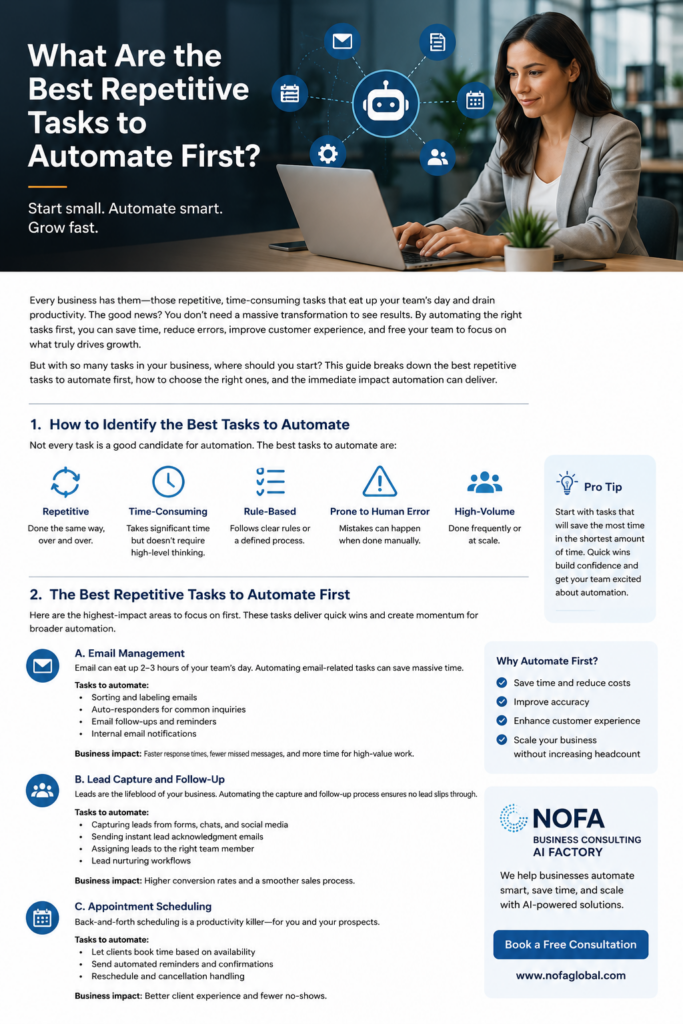
What Are the Best Repetitive Tasks to Automate First?
Every business has repetitive tasks. Some are small. Some are time-consuming. Some are so familiar that the team no longer notices how much time they take. But together, these repeated manual actions can quietly drain productivity, slow down customer service, create errors, and keep business owners stuck in daily operations instead of growth.
The good news is that automation does not have to start with a massive digital transformation project. In fact, the best automation strategy usually starts small.
The smartest place to begin is with repetitive, rule-based, high-frequency tasks that consume time but do not require deep human judgment every time they happen. These are the tasks that can be automated first to create quick wins, build confidence, and free your team for more valuable work.
At NOFA Business Consulting and NOFA AI Factory, we help businesses identify, design, and implement AI-powered automation systems that solve real operational problems. The goal is not to replace people. The goal is to remove unnecessary busywork so people can focus on customers, strategy, relationships, and revenue.
Why Businesses Should Automate Repetitive Tasks First
Many business owners know they need automation, but they are not sure where to begin. That uncertainty often causes delay. They imagine automation as something complicated, expensive, or only for large companies with technical teams.
That is no longer true.
Today, small and mid-sized businesses can use AI automation, workflow automation, smart forms, chat assistants, CRM workflows, email automation, scheduling tools, document automation, and internal AI agents to reduce manual workload in practical ways.
The key is choosing the right tasks first.
A good first automation project should meet several criteria:
It happens often.
It follows a predictable process.
It takes time away from higher-value work.
It creates errors when done manually.
It affects customers, leads, staff, or revenue.
It can be improved with existing tools, AI, or a custom workflow.
When a task meets those conditions, it becomes a strong automation candidate.
1. Email Sorting, Replies, and Follow-Ups
Email is one of the best repetitive tasks to automate first because it affects almost every business. Teams spend hours every week reading, sorting, responding to, forwarding, and following up on emails.
Some emails require thoughtful human attention. Many do not.
Routine email automation can help with:
Common customer questions
Appointment confirmations
Follow-up reminders
Lead acknowledgment emails
Internal notifications
Document request emails
Status updates
Newsletter delivery
Missed-response reminders
For example, when a prospect fills out a contact form, the business should not wait until someone manually sees the message. An automated workflow can immediately send a confirmation, notify the correct team member, create a CRM record, and schedule a follow-up task.
This type of automation improves response time and reduces missed opportunities. For many businesses, faster follow-up alone can increase conversions.
A smart AI assistant can also help draft replies, summarize long email threads, classify inquiries, and identify urgent messages. This does not remove the human from the process. It gives the human a faster starting point.
2. Lead Capture and Lead Follow-Up
Lead management is one of the highest-value areas to automate because leads are directly connected to revenue.
Many businesses lose potential customers not because the product or service is weak, but because the follow-up process is inconsistent. Someone fills out a form, sends a message, visits a landing page, scans a QR code, or asks a question — and then the business responds too late.
Automation can fix this.
Lead capture and follow-up automation can include:
Capturing website form submissions
Collecting chatbot conversations
Recording QR code interactions
Sending instant thank-you messages
Assigning leads to the correct person
Creating CRM records
Sending follow-up emails
Notifying the owner or sales team
Tracking lead source
Reminding staff to follow up again
This is especially powerful when combined with AI. For example, JudyVA™ can speak with website visitors, answer common questions, collect lead information, and guide the visitor toward booking a consultation or taking the next step.
For service businesses, this can turn a static website into an active lead-generation system.
3. Appointment Scheduling and Reminders
Scheduling is another ideal task to automate first. Back-and-forth scheduling wastes time for both the business and the customer.
A manual scheduling process often looks like this:
“What time works for you?”
“How about Tuesday?”
“I’m not available then.”
“Can you do Thursday morning?”
“Maybe after 2 PM.”
This may sound simple, but repeated across dozens of customers or prospects, it becomes a major productivity drain.
Automated appointment scheduling can handle:
Availability display
Self-booking links
Confirmation emails
Calendar invitations
Reminder messages
Rescheduling links
Cancellation workflows
Post-meeting follow-up messages
This improves the customer experience because people can book when they are ready, without waiting for a reply.
For businesses using AI assistants, scheduling can become even more conversational. A visitor can ask questions, understand the service, and then be guided to book a consultation directly.
4. Customer Service FAQs
Customer service is one of the most common areas for automation because many customer questions repeat.
Customers often ask:
What are your hours?
Where are you located?
What services do you offer?
How much does it cost?
Do you accept appointments?
What documents do I need?
How do I contact support?
Do you provide this service in my area?
What is the next step?
If staff members answer the same questions every day, automation can help.
An AI assistant or smart chatbot can answer frequently asked questions 24/7, using approved business information. This is valuable for restaurants, healthcare offices, consultants, hotels, property managers, contractors, professional services, and many other industries.
The important point is that the AI must be trained properly. A generic chatbot is not enough. The assistant should understand the specific business, its services, policies, tone, contact information, booking process, and customer journey.
That is where a solution like JudyVA™ becomes more powerful than a basic website chat widget. Judy can be configured for different business roles, such as JudyServe™ for restaurants, JudyHotel™ for hospitality, JudyCare™ for healthcare front-desk support, and other vertical use cases.
5. Data Entry and CRM Updates
Manual data entry is one of the most frustrating repetitive tasks in business. It is also one of the easiest places to create errors.
Businesses often copy information from one place to another:
Website forms to spreadsheets
Emails to CRM records
Customer calls to notes
Invoices to accounting systems
Orders to tracking sheets
Applications to internal files
Support requests to ticket systems
This work is necessary, but it is not always the best use of human time.
Automation can help move information between systems, standardize fields, reduce missing data, and keep records current.
For example, when a lead fills out a form, automation can create a CRM contact, tag the lead source, assign a status, send a confirmation email, and alert the sales team. No copying and pasting required.
Clean data also makes future AI systems smarter. If your business information is organized, your dashboards, reports, follow-ups, and AI assistants become more reliable.
6. Internal Notifications and Task Routing
Many businesses lose time because information does not reach the right person quickly.
A customer asks a question.
A document arrives.
A lead requests pricing.
A support issue comes in.
A staff member needs approval.
A client asks for an update.
If these items sit in an inbox or get forwarded manually, delays happen.
Automation can route tasks based on rules:
New lead → sales team
Billing question → accounting
Technical issue → support
Appointment request → front desk
Document upload → operations
Urgent complaint → manager
Website inquiry → business owner
This is one of the major ideas behind AI orchestration. The AI does not just answer questions. It helps move work through the business.
For many companies, this is where automation becomes more than convenience. It becomes operational infrastructure.
7. Document Collection and Processing
Document-related tasks are common in healthcare, legal, consulting, real estate, finance, insurance, education, and many service businesses.
Teams often spend time requesting, receiving, checking, renaming, organizing, and forwarding documents.
Automation can improve this process by helping with:
Document request emails
Upload links
Intake forms
File naming
Status tracking
Missing item reminders
Internal review routing
Client confirmation messages
AI can also help summarize documents, extract key information, classify files, and identify missing details. Human review is still important, especially in regulated industries, but automation can reduce the preparation burden.
For example, before a consultation, a business can automatically collect intake information and supporting documents so the meeting is more productive.
8. Invoicing, Payment Reminders, and Billing Follow-Up
Billing workflows are another strong automation opportunity. Many small businesses rely on manual reminders, which can create delays in cash flow.
Automation can help with:
Invoice creation reminders
Payment confirmation emails
Overdue payment reminders
Subscription renewal notices
Receipt delivery
Internal alerts for unpaid invoices
Client follow-up sequences
This does not mean every financial process should be fully automated without oversight. But many repetitive communication steps around billing can be handled by workflow automation.
The result is better consistency and fewer uncomfortable manual follow-ups.
9. Reporting and Weekly Summaries
Business owners need visibility, but manual reporting takes time.
Instead of manually checking multiple systems, automation can generate summaries such as:
Weekly lead report
Website inquiry report
Sales pipeline summary
Customer service issue summary
Appointment report
Outstanding task list
Marketing performance snapshot
AI assistant conversation summary
This is especially useful for business owners who do not want to log into multiple dashboards.
At NOFA AI Factory, this type of reporting is important because automation should not be invisible. Owners need to know what the AI handled, what leads came in, what questions customers asked, and what needs attention.
Automation should create clarity, not confusion.
10. Social Media and Content Workflow Support
Content creation should not be fully automated without strategy, but many parts of the content workflow can be improved with AI.
Businesses can automate or semi-automate:
Blog topic planning
Keyword research support
Draft outlines
Social post repurposing
Content calendars
Image suggestions
Publishing reminders
Performance tracking
Follow-up content ideas
For example, one blog post can become multiple social posts, email newsletter content, short video scripts, and sales talking points.
This is very useful for businesses that need consistent visibility but do not have a full marketing department.
What Should Not Be Automated First?
Not every task should be automated immediately.
Businesses should be careful with tasks that require:
Sensitive judgment
Emotional intelligence
Legal or medical decision-making
Complex negotiations
High-risk approvals
Unclear rules
Poor-quality data
Unstable processes
If a process is messy, automation may make the mess faster. Before automating, the workflow should be clarified.
This is why the best automation projects begin with process review. The question is not only “Can this be automated?” The better question is “Should this be automated now, and what business outcome will it improve?”
A Simple Framework for Choosing What to Automate First
Before investing in automation, ask these questions:
How often does this task happen?
How much time does it take each week?
Does it follow repeatable steps?
Does it create errors or delays?
Does it affect customers or revenue?
Can success be measured?
Would automation free the team for higher-value work?
The best first automation project usually has high impact and low complexity.
That means it saves noticeable time, improves service, or reduces errors without requiring a complete rebuild of the business.
Good first projects include email follow-ups, lead capture, appointment scheduling, FAQ automation, CRM updates, internal notifications, and weekly reporting.
How NOFA Business Consulting Helps Businesses Automate Smarter
Automation is not just about connecting tools. It is about understanding how the business works.
At NOFA Business Consulting, we help business owners identify practical automation opportunities, prioritize the right tasks, and design systems that support real operations.
At NOFA AI Factory, we build AI-powered tools, assistants, and workflows around specific business needs. That can include customer-facing AI assistants, internal workflow automation, lead capture systems, smart intake processes, reporting tools, and custom AI solutions.
Our approach is simple:
Start with the business problem.
Identify repetitive work.
Prioritize high-impact automation.
Build a practical solution.
Measure results.
Improve over time.
Automation should not feel overwhelming. Done correctly, it should feel like the business finally has help where it needs it most.
Final Thoughts: Start Small, Automate Smart, Then Scale
The best repetitive tasks to automate first are the ones that waste time, follow predictable steps, and affect customers, leads, staff, or revenue.
Start with tasks like email follow-up, lead capture, scheduling, FAQs, CRM updates, task routing, document collection, billing reminders, and weekly reporting.
You do not need to automate everything at once. In fact, you should not.
Start with one valuable workflow. Prove the impact. Then expand.
That is how smart automation becomes a growth system.
If your business is still relying on manual follow-ups, repeated emails, copy-and-paste data entry, missed leads, and inconsistent customer responses, now is the time to explore automation.
NOFA Business Consulting and NOFA AI Factory can help you identify what to automate first and build the right AI-powered solution for your business.
Call to Action
Ready to automate smarter?
Schedule a consultation with NOFA Business Consulting and discover which repetitive tasks in your business should be automated first.
Visit: https://nofabusinessconsulting.com
Explore NOFA AI Factory: https://nofaaifactory.com